Using Steady
How to build and save a sound mix in Steady
Steady's Soundscapes screen lets you layer sounds and keep a named mix for later. The mixer brings individual levels, a timer and saved presets together. This is a guide to the app's audio controls, without promises about sleep quality or health outcomes.
Choose sounds in the library
From Track, open Sleep Center, then choose Sound library. The destination is labeled Soundscapes. Its sound tiles let you build a combination instead of choosing only one recording.
Tap a sound tile to turn that sound on. A selected tile shows its level and a playing indicator. Tap the tile again to remove that sound from the mix. The heart control is separate: it keeps a sound in Favorites, rather than saving your whole combination.
- Open Track, then Sleep Center.
- Choose Sound library.
- Tap a sound tile to add it.
- Add another sound if desired, or tap a selected tile to remove it.

Open the mixer and set a timer
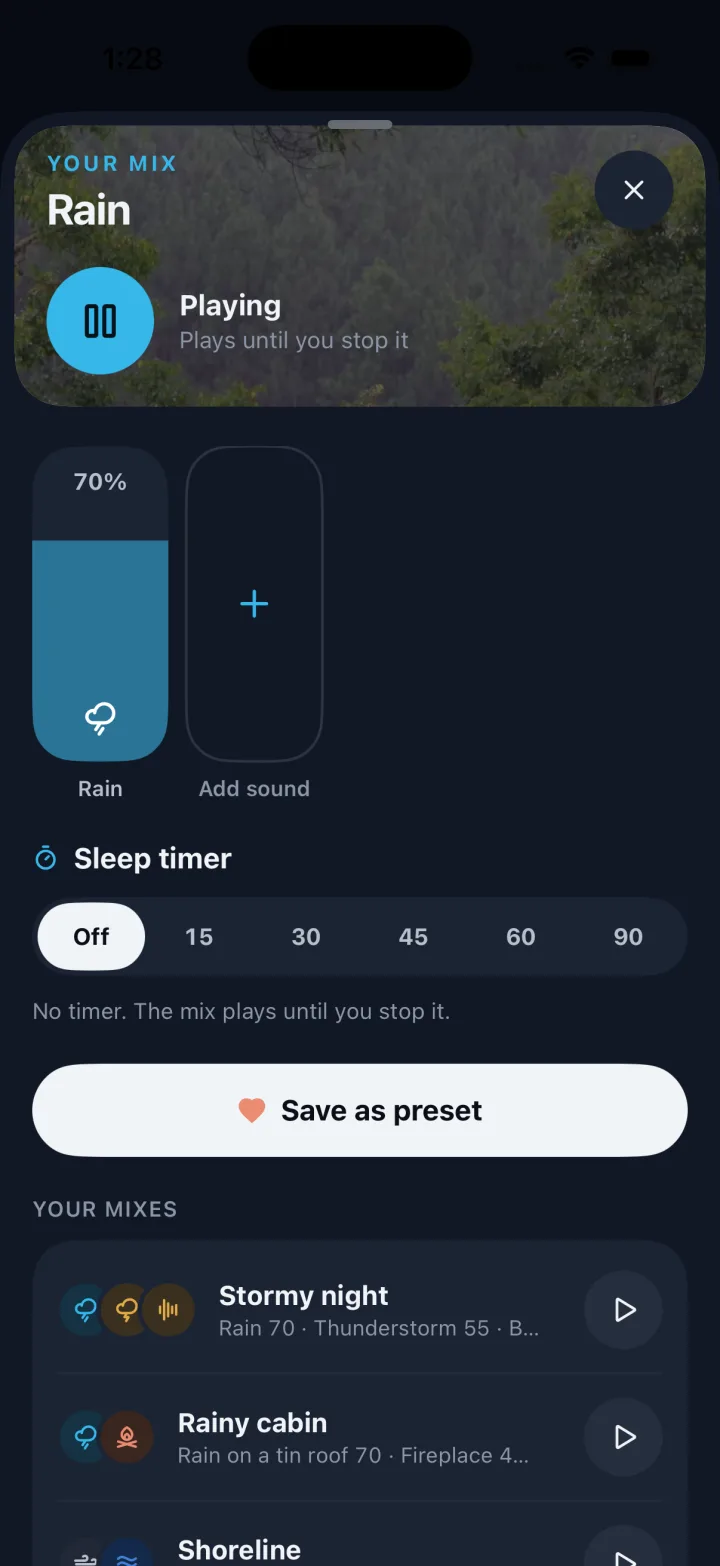
Open the now-playing row to reach the mixer. Where Edit appears alongside your mixes, it also opens the mixer. Individual faders adjust the sounds independently, so you can keep one sound prominent and another quieter.
Sleep timer offers Off, 15, 30, 45, 60 and 90 minutes. With a timer selected, the mix fades out over the final 20 seconds. Off means it plays until you stop it. Check this setting before saving, because the timer is part of the preset.
- Open the now-playing row or tap Edit.
- Adjust each active sound's fader.
- Choose a Sleep timer duration, or Off.
- Listen to the combination and adjust again if needed.
Save a reusable preset
A preset keeps the selected sounds, their levels and the timer together. Choose Save as preset, enter a name in Name this mix, then use Save preset. A descriptive name can make it easier to recognize your combination without reopening every setting.
Saved mixes appear in the preset list. Select one to use its stored combination. If you change a level and want to keep the new version, save a new preset. To remove a mix you no longer want, press and hold it and choose Delete mix. Stop and clear removes the current playing combination; it is a different control from deleting a saved preset.
- Choose Save as preset.
- Enter a name under Name this mix.
- Tap Save preset.
- Select the saved mix when you want to use it again.
Before you rely on this workflow
- Favoriting a sound and saving a mix are different actions.
- This guide describes audio controls, not a treatment for sleep problems.
- The native app stores sound preferences locally; this walkthrough does not claim cross-device or web preset synchronization.
Read the Privacy Policy for storage and connected-service details. These instructions describe product controls and recorded observations, not treatment decisions.
Keep working with your record
Save and share your record · Choose a GLP-1 tracker · All Steady guides
Explore Steady