Using Steady
How to track GLP-1 side effects as a symptom record in Steady
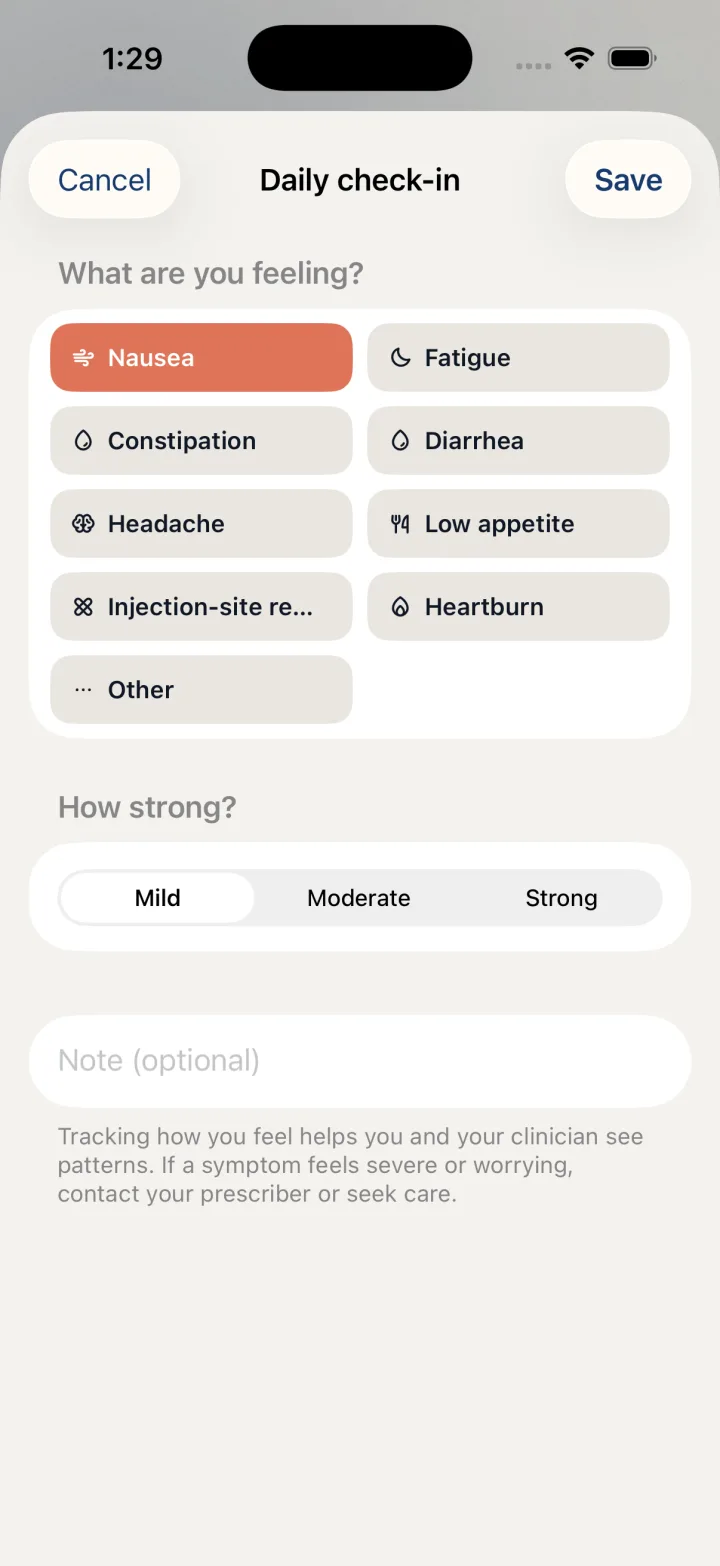
A symptom entry gives you a place to record what you noticed and an optional note in your own words. In the Steady iPhone app, this is a different workflow from the four-rating daily check-in. The menu calls it Log a symptom, although the sheet currently uses the title Daily check-in. Follow the fields below to recognize the right screen.
Open the symptom entry sheet
Use the floating plus button to reach the logging menu. Choose Log a symptom rather than Daily check-in. The symptom sheet is recognizable by its What are you feeling? choices, its three strength levels and its optional note field.
The separate Daily check-in menu item opens ratings for appetite, energy, mood and cravings. If you see four numbered scales instead of symptom choices, cancel that sheet and return to Log a symptom. The similar titles do not mean that the two forms save the same kind of entry.
- Tap the floating + button.
- Choose Log a symptom.
- Confirm that you see What are you feeling? and How strong? on the sheet titled Daily check-in.
Choose what to record
Tap the symptom you want this entry to describe. The choices are presented as buttons, and the selected button changes appearance. Next, choose the strength that matches your own observation using the Mild, Moderate and Strong controls. These labels record your selection; they are not a clinical assessment.
The Note (optional) field provides room for context you want to remember. For example, you could write what you were doing when you noticed the symptom or a question you want to ask later. Keep the note factual and personal rather than using it to infer a cause from timing alone.
- Under What are you feeling?, select the relevant symptom.
- Under How strong?, choose Mild, Moderate or Strong.
- Add a Note (optional) if you want to preserve context.
- Tap Save in the top bar. Tap Cancel instead if you do not want to record the entry.
Find the review screen
Symptom insights is accessible from Track. It is the review destination, not the name of the entry form. Knowing that distinction helps you move between recording an observation and looking back at your records without searching for another Save button on the insights screen.
A record can help you describe an experience, but it does not establish why something happened. Do not treat an app pattern as a diagnosis or a reason to change treatment. The entry sheet itself advises contacting your prescriber or seeking care if a symptom feels severe or worrying. Recording an entry should not delay that action.
- Open Track.
- Choose Symptom insights to reach the symptom review screen.
Before you rely on this workflow
- Log a symptom and the four-rating Daily check-in save different records.
- The symptom sheet currently has the title Daily check-in.
- Symptom records and insights do not diagnose a condition or direct treatment.
Read the Privacy Policy for storage and connected-service details. These instructions describe product controls and recorded observations, not treatment decisions.
Keep working with your record
Save and share your record · Choose a GLP-1 tracker · All Steady guides
Explore Steady