Using Steady
How to complete or update your daily check-in in Steady
Steady's daily check-in collects four self-reported ratings: appetite, energy, mood and cravings. You choose a number from 1 to 5 for each, then save them together. This iPhone walkthrough explains where to find the form, how the endpoints differ across the scales, and why saving again updates today's record instead of creating a second daily check-in.
Find the four-rating form
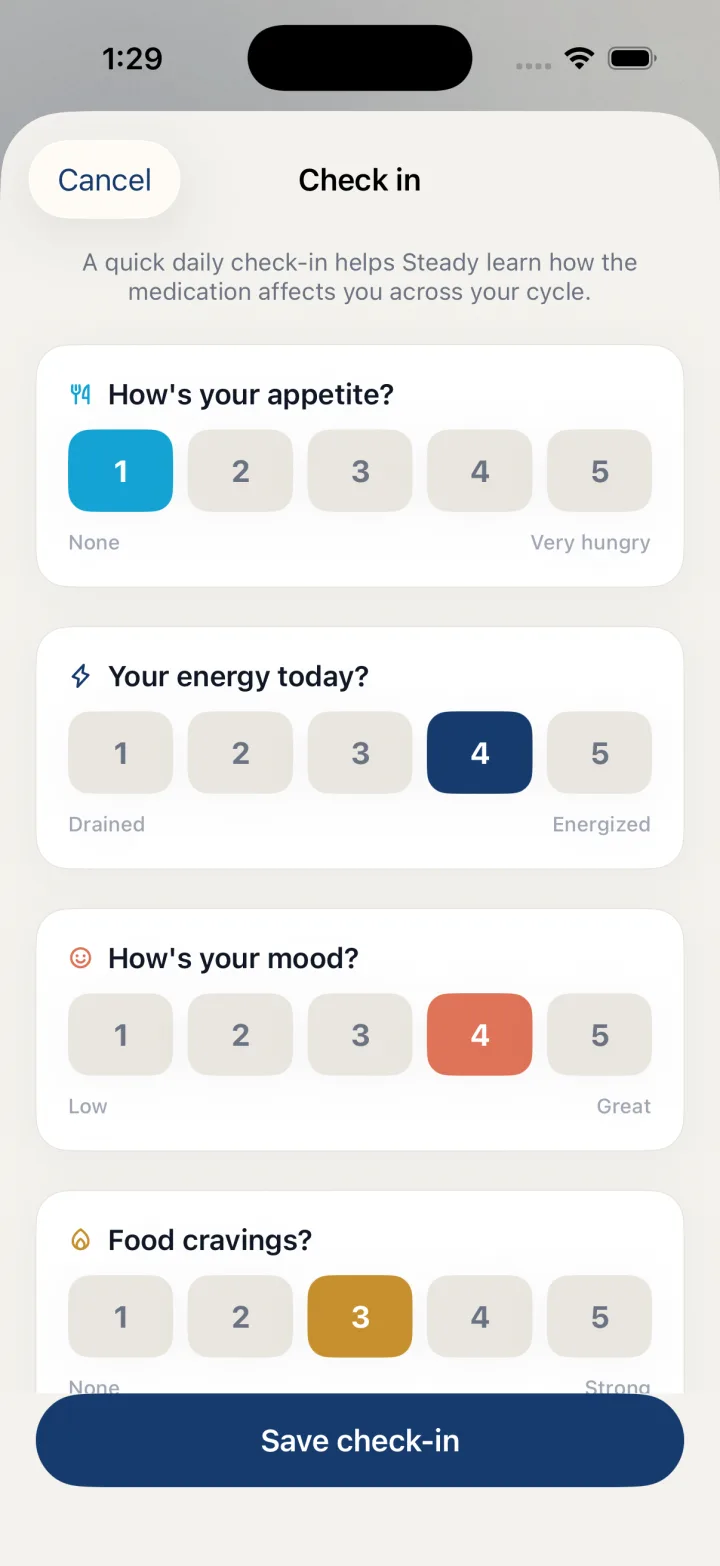
Open the floating plus menu and choose Daily check-in. The screen title is Check in. You should see four numbered scales rather than the symptom selection buttons found under Log a symptom. These are separate workflows, even though the symptom sheet also currently uses Daily check-in as its title.
If you have already saved a check-in today, reopening this form loads those ratings. For a new form, each scale starts at 3. Review all four selections before saving; an initial or previously saved value is not a new observation until you have checked it against what you intend to record.
- Tap the floating + button.
- Choose Daily check-in.
- Confirm the Check in screen contains appetite, energy, mood and cravings scales.
Read each scale's endpoints
A larger number does not mean the same thing on every scale. Appetite runs from None to Very hungry. Energy runs from Drained to Energized. Mood runs from Low to Great. Food cravings runs from None to Strong. Read the endpoint labels instead of assuming that 5 always means a better or worse day.
Choose the rating that best captures your own observation. These are subjective entries, not measurements that need to match someone else's score. Using the same understanding of each scale when you return can make your record easier for you to read later, without turning the ratings into a diagnosis.
- Select a value from 1 to 5 for How's your appetite?.
- Select a value for Your energy today?.
- Select a value for How's your mood?.
- Select a value for Food cravings?.
- Review all four ratings, then tap Save check-in.
Update an entry later the same day
You can reopen Daily check-in and change the selections if you want today's saved record to reflect an updated observation. The app removes the existing check-in for today before saving the replacement. It keeps one daily check-in rather than a series of timestamped check-ins within the same day.
This matters if you were hoping to compare morning and evening ratings: this form is not a multiple-entry diary for one day. Decide what you want the day's record to represent before replacing it. Use Cancel to leave without saving the current form. This walkthrough describes recording behavior only and does not interpret the ratings or recommend changes to care.
Before you rely on this workflow
- Saving again replaces today's earlier check-in.
- The form is not a within-day series of multiple check-ins.
- Ratings are self-reported and do not direct treatment.
Read the Privacy Policy for storage and connected-service details. These instructions describe product controls and recorded observations, not treatment decisions.
Keep working with your record
Save and share your record · Choose a GLP-1 tracker · All Steady guides
Explore Steady